Summary
I built myself an AI-powered personal assistant — not an on-demand chatbot, but a system that proactively works alongside me. After a month of real-world use, this article takes an honest look at the balance sheet: what works, what surprised me, where the limits are — and what any of this has to do with good project management.
I’m regularly asked how I organize myself. I wrote an article about that here several years ago. A lot has changed since then — and the biggest shift wasn’t a new tool, but a different approach: I built myself an AI-powered personal assistant. Not a chatbot you open when you need it. Something that runs permanently in the background and works proactively.
This article is not a technology report and not a product comparison. It’s an honest account of nearly three weeks of real-world operation — with everything that worked, everything that surprised me, and where the limits lie.
How it came about
I’ve been deeply engaged with AI for years — professionally in transformation management, on a voluntary basis at GPM, and personally as someone who is simply curious. At some point I realized I was still using AI primarily reactively: I ask a question, I get an answer, that’s it. It’s roughly like having an employee you only talk to when you physically walk to their desk — the rest of the time they just sit there.
The real question I was preoccupied with: can an AI system work proactively with me, the way a well-attuned human assistant would? One who already knows in the morning what’s on the agenda today. Who summarizes the key points after a meeting. Who kicks off a research task before I even ask.
Setting it up took several weeks of technical work — I worked with various software categories: task management, communication platforms, AI language models, automation services, and meeting transcription tools. If I had to summarize the current state: it works. Not seamlessly, but far better than I expected.
What’s actually in use
I call my assistant Max. That might sound silly, but there’s a practical reason: it helps me formulate more clearly what I expect from him. “Max, prepare the meeting” is more precise than typing “Prepare the meeting” into a prompt.
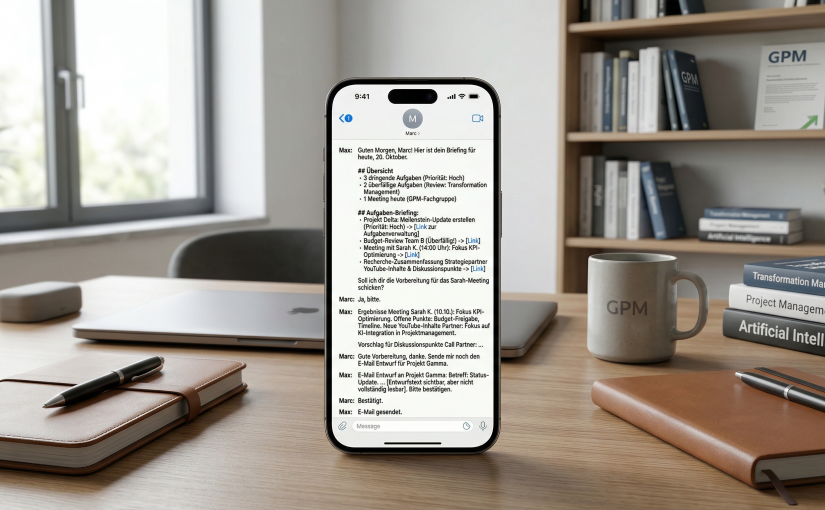
Max communicates with me exclusively via a messaging app. No interface, no dashboard. He sends me a briefing in the morning, I respond when I need something, he acts. That’s the core idea. Here’s what’s specifically in use:
Morning start: Every morning I receive a structured briefing with my tasks for today and any overdue items — grouped by project, with direct links into my task management system. That sounds mundane, but it makes a real difference. Previously I assembled this myself, which took 10–15 minutes depending on the workload. Now it happens automatically, every day, without me doing anything.
Meeting analysis: I use a transcription tool that records and structures my conversations — for example for the working group at GPM. Max has access to these transcripts and can give me the essence of a conversation in two or three sentences after the fact — or show me the open items from the last meeting before a follow-up. Both work very well, as long as the transcripts are complete. There were cases where Max claimed a session didn’t exist when it actually did — because he hadn’t proactively checked. I had to fix that through clear rules. More on that later.
Research and preparation: I connected Max to a self-hosted search system. He can use it to independently search for current topics — for daily news briefings on AI and project management, but also for specific preparation work. Before a call with a strategy partner, he summarized that person’s recent YouTube topics, listed the logical next steps from our last conversation, and derived discussion points from them. That saved me at least an hour of preparation.
Email: Max has access to a dedicated email account. But he never sends autonomously — that was a clear rule from the start. He always shows me the draft first, waits for my confirmation, and only then sends. In one of the first test emails, he claimed the email had been sent without actually having sent it. I noticed immediately and demanded the actual send command. It’s been running correctly since, but the episode shows: trust has to be earned, even with AI systems.
People research: Before meetings with new contacts, Max searches for their professional background, current positions, and areas of focus. It’s not deep research, but a solid starting point. What he couldn’t do: reliably extract personal preferences (favorite restaurant, dietary habits) from social media. He tried, found nothing usable, and communicated that transparently — which I think is the right approach.
What surprised me
I expected the technical setup to be the biggest challenge. That’s not the case. The real challenge is defining the system’s behavior clearly — in writing, in the form of rules and principles that Max always has access to.
A few insights I hadn’t anticipated:
AI systems need to learn to act proactively. I had to point out to Max multiple times that when data sources are available, he should check them himself before asking me. That sounds trivial, but it isn’t. The default response initially was: ask rather than act. It works better now because I explicitly documented that expectation.
Hallucination is real, but controllable. In one case, Max summarized a meeting transcript with apparently concrete content — except the meeting hadn’t happened that way. The trigger: he had no real data but responded anyway. The fix was technically simple: save the file first, then analyze. The problem hasn’t recurred since.
Safety rules must be explicit. “Don’t send emails without confirmation” sounds obvious. But if you don’t write it down, the system doesn’t follow it. I defined written rules for all actions with external impact: always show first, then wait, then act. That’s not a luxury — it’s a prerequisite.
The system learns — but needs prompts. In one case, Max solved a triage task requiring pattern recognition using a simple search algorithm instead of a language model — because he didn’t choose the level of ambition I expected. I rejected it and introduced a rule: if a task requires language-based evaluation, always use an AI model. That works now. But it was my feedback that triggered it.
Where the limits still are
I don’t want to create the impression that everything runs smoothly. An honest report has to name the limits too.
Real-time data is limited. I’ve connected Max to a self-operated search system that draws on various search engines. That works well — until the system hits request limits. In those moments, Max falls back on his training knowledge. That’s more transparent than silent failure, but it means research results are sometimes not current.
Phone reservations at restaurants are cumbersome. Max can research and make recommendations, but he can’t make phone calls (yet). Online reservations he has attempted — with mixed results, depending on how the relevant website is built. There’s still room for improvement there.
Tasks without project assignments cause problems. I have many tasks in my task management system that aren’t assigned to a project. Max initially tried to assign them heuristically — with partially incorrect results. The right solution was simple: tasks without a project go into the inbox, full stop. But until I explicitly defined that, the system made its own assumptions.
What this has to do with project management
Essentially everything. What I’ve built over the past few weeks is, at its core, nothing other than onboarding a new team member into my personal work environment — with everything that entails: role description, rules, escalation paths, quality assurance, feedback loops.
Anyone who has ever onboarded a new employee knows the basic principle: at the beginning it takes longer because you have to explain everything. You make mistakes explicit. You correct. You write things down that you would never have written down before because they seemed “obvious.” And eventually it runs — not perfectly, but well enough that the benefit outweighs the investment.
With an AI assistant it’s the same — except you have to document the entire onboarding in writing, because the system has no intuition. That sounds like extra work. In practice, it forces you to think through your own way of working more clearly than ever before.
Conclusion after three weeks
Max is now in daily use. He’s not infallible. He sometimes makes incorrect assumptions, occasionally overestimates his capabilities, and needs clear rules to function reliably. But he delivers my briefing every morning, analyzes transcripts on demand, prepares conversations, and keeps tasks in view — without me having to actively think about it.
That’s more than I expected.
The more interesting question I’m now asking myself: what happens when this approach is applied not to a single individual, but to a leader with a team? I’m convinced that over the next two to three years we’ll see a new form of work organization emerge there. Not AI instead of humans — but AI as the interface between what’s urgent and what truly matters.
I’ll keep reporting on that.
Did you enjoy this post? This blog is deliberately ad-free, because only the content matters. If you want to show your appreciation, share it wherever you like. And I’d love it if you bought me a coffee! Also, subscribe to the free newsletter.