Max – My New Assistant Works for €5 a Month

4 min.

Summary

This week, a new team member started working with me: Max. In this post, I describe why I chose a self-hosted AI assistant, how the onboarding went, and what technical architecture is behind it. The post also shows why the question is no longer “Which AI tool should I use?” but rather “How do I integrate AI as a permanent part of the way I work?”

A New Team Member

This week, Max started working with me. My new personal assistant.

The first week of a new team member is always special. You get to know each other, talk about working styles, expectations, and how collaboration can work well. That’s exactly where we are right now.

Honestly, I was skeptical at first whether this would work. I’m someone who doesn’t like giving up control. My tasks, my structure, my priorities – I don’t just let someone else take over. But at some point you realize: doing it alone doesn’t scale. And that was the moment I started rethinking the concept of a “personal assistant” from scratch.

Onboarding Like Any Other Team Member

Max is currently focused on understanding how I work: How do I prioritize? Which topics are strategically important? What can be automated – and where do I want to consciously decide myself?

Especially in task management, he already supports me in maintaining structure and keeping topics cleanly organized. What surprised me: he doesn’t just gather information, he thinks along. He suggests connections I would have overlooked myself.

Data privacy was important to me from day one. When an assistant gets access to tasks, documents, and workflows, there need to be clear rules. That’s why responsible data handling was one of the first things we established together. No compromise.

And yes – the salary was negotiated too: €5 fixed salary per month. Increase to €8 per month after two years. Plus a performance-based component of up to €45 per month. The salary negotiation was unusually short.

Who Is Max?

If you’ve read this far and are wondering who works for €5 a month: Max is an AI.

More precisely: Max is a self-hosted, personal AI assistant running on my own server. No ChatGPT tab in the browser. No copy-paste from a chat window. Instead, a system that is integrated into my daily workflows and can take on tasks independently.

This was particularly important to me: not yet another tool running in parallel. But something that fits seamlessly into my existing way of working.

The Technical Foundation: OpenClaw on My Own Server

Max is built on OpenClaw – an open-source platform for self-hosted AI assistants. The core principles that convinced me:

Own infrastructure, own data. OpenClaw runs on my own VPS – a German Virtual Private Server. My data never leaves my infrastructure. For someone who works professionally in regulated industries like banking and insurance, this isn’t a nice-to-have – it’s a prerequisite also for my own data.

Gateway architecture. OpenClaw works through a gateway that bundles different communication channels. You install the server once, connect the channels you want – and can reach the assistant wherever you already communicate. The principle: the AI comes to the existing tools, not the other way around.

Modular skills and integrations. The assistant isn’t monolithic but modular. Capabilities are added as “skills” and can be individually configured. This starts with task management and extends to document research.

Onboarding via wizard. The initial setup runs through a guided installation process that walks you step by step through configuration, security settings, and channel connections. No 200-page manual, but a structured setup.

Persistent memory. Unlike a one-off chat, Max “remembers” context, preferences, and working methods. This fundamentally changes the nature of collaboration – from a single prompt to an ongoing working relationship.

What Max Already Handles Today

The first integrations are active:

  • Todo management and task organization
  • Consolidating information from various sources
  • Preparing notes and documents

In the coming weeks, additional capabilities will follow: research on project topics, knowledge and document organization, automation of recurring workflows.

Why I’m Sharing This

Not because I think everyone should immediately set up their own AI assistant. But because I believe a fundamental question has shifted.

The old question was: “Which AI tool should I use?” – ChatGPT, Claude, Gemini, whatever is trending at the moment.

The new question is: “How do I integrate AI as a permanent part of the way I work?”

There’s a difference. One is tool selection. The other is work design. And this is exactly where it gets interesting from a project management perspective: because anyone who treats AI not as a tool but as a team member has to deal with onboarding, processes, data privacy, and governance – precisely the topics we as project managers should already master.

I’ll report on how the collaboration with Max develops. Step by step.

If you’re interested in perspectives like these on leadership, transformation, and project management, feel free to subscribe to my newsletter 👉 marc-widmann.de/newsletter



To Lead is to Listen – The 4-Ears Model in Practice

3 min.

Summary

Communication rarely fails because the wrong thing is said, but because the wrong thing is heard. Friedemann Schulz von Thun’s “4-Ears Model” is far more than just theory – it is a diagnostic tool for leadership effectiveness. To help you analyze your own listening preferences in everyday situations, I have developed an interactive AI coach. Test your communication style directly here:  https://marc-widmann.de/thun


The Eternal Misunderstanding in Leadership

We know the scenario from every project meeting and performance review: A sentence is spoken, meant to be factually correct and precise. Yet, something completely different arrives at the other end. A statement regarding a timeline is interpreted as an accusation. A suggestion for improvement is perceived as personal criticism. Or a silent wish for support is simply ignored because the receiver is fixated solely on hard facts.

In my work with executives and transformation projects, one thing becomes clear again and again: The bottleneck is not the strategy, but the “translation effort” between sender and receiver.

The Scientific Background: The Anatomy of a Message

Communication psychologist Friedemann Schulz von Thun created a standard with the “Communication Square” (better known as the 4-Ears Model) that combines systemic and humanistic approaches. The central thesis is as simple as it is radical: Every message is four-dimensional. No matter what we say, we always transmit on four channels simultaneously – and the receiver decides which one to “tune into.”

  1. Factual Information: What am I informing about? (Data, facts, subject matter).

  2. Self-Revelation: What do I reveal about myself? (Values, emotions, motives).

  3. Relationship: How do I stand vis-à-vis you? (Attitude, respect, hierarchy).

  4. Appeal: What do I want you to do? (Wishes, calls to action).

The scientific significance of this model lies in the realization that we usually have a “favorite ear.” This preference is often biographically shaped or conditioned by corporate culture. Someone who has worked in project controlling for years often hears only with the Factual Ear, missing quiet warning signals on the relationship level. Conversely, someone with a strong need for harmony often hears attacks (Relationship Ear) where there are none.

Use Cases: Why Leaders Need to Know Their “Ears”

The model is not an academic construct, but a tool for everyday leadership.

The “Appeal Ear” Trap for Managers Leaders are trained to solve problems. This often leads to a hypertrophic Appeal Ear. An employee might simply want to unburden themselves emotionally (Self-Revelation: “I am stressed”), but the leader immediately hears a work order and provides unsolicited solutions. The result: The employee does not feel understood, but rather “processed.”

Conflicts in the Matrix In modern matrix organizations, clear hierarchical power is often missing. Leadership happens here through relationships and influence. If a sender argues purely factually, but the receiver “hears” sensitively on the relationship level (e.g., “Does he respect my role?”), resistance arises that cannot be explained logically. The model helps to switch levels here and resolve conflicts where they originated.

Stress as an Amplifier Under pressure, we fall back into old patterns. In crisis situations, we tend to listen one-sidedly. The ability to self-reflect – “With which ear did I just hear that?” – is an essential component of emotional intelligence and modern resilience.

Your Personal Profile: The Interactive Test

It is easy to understand the model intellectually. It is much harder to recognize one’s own unconscious reaction patterns. That is exactly why I developed a new tool.

Based on classic everyday situations, I have trained a Custom GPT that acts as a neutral moderator. It simulates 12 scenarios – from waiting at the bakery to discussions in a meeting – and evaluates your spontaneous reactions.

Unlike static questionnaires, this AI assistant guides you interactively through the process and creates a profile of your “four ears” at the end. You don’t get a generic assessment, but a reflection of your tendencies:

  • How strong is your Factual Ear?

  • Do you systematically overlook Appeals?

  • Do you take things personally too quickly?

This clarity is the first step toward steering your communication more consciously.

Try it out and use the evaluation for your next reflection:  https://marc-widmann.de/thun

Big Picture in Project Management

2 min.

Summary

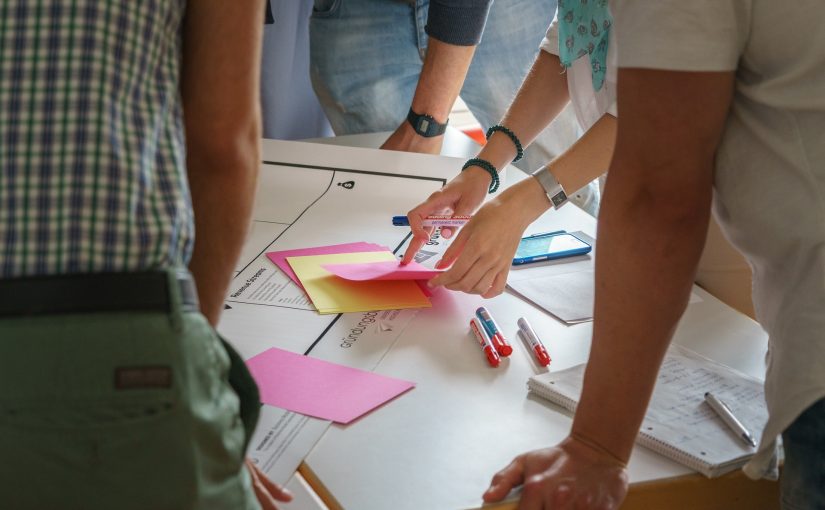
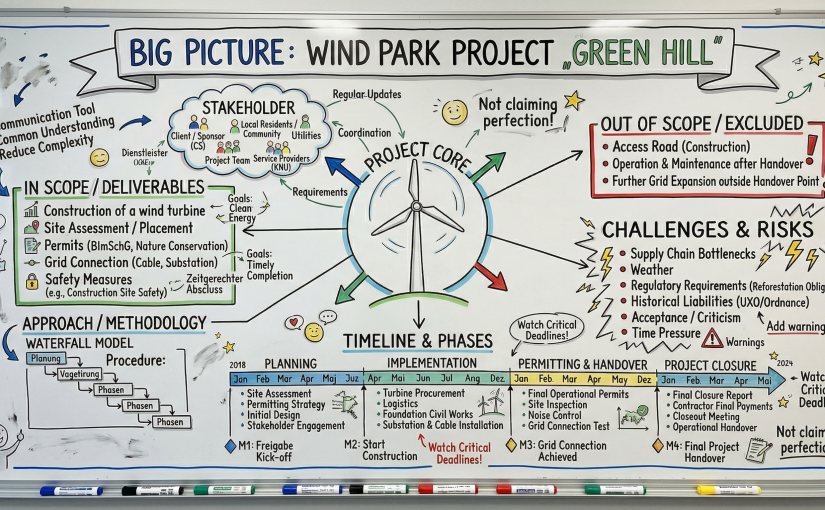
A Big Picture is a visual representation of a project that makes its context, challenges, and key elements immediately graspable. It is especially valuable when developed in a workshop with a small, interdisciplinary team—without striving for perfection, but with a playful mindset. The Big Picture serves as a communication tool, promotes shared understanding, and helps reduce complexity. It can be refined as the project progresses and provides a foundation for stakeholder communication.

Why create a Big Picture?

Projects are often complex and full of uncertainties. A Big Picture helps make the essential aspects tangible:

  • Deliverables and scope: What belongs to the project? What is deliberately excluded?
  • Stakeholders: Who is involved, who is affected?
  • Milestones and phases: Which steps are planned, which dates are critical?
  • Risks and constraints: Which external factors influence the project?

By visualizing these elements, misunderstandings are avoided and everyone works from the start with a shared baseline.

Practical application

Identifying deliverables

In a fictional project to build a wind turbine, it quickly becomes clear that not only the main asset (e.g., a construction site) but also additional components such as permits, safety measures, and possibly even preliminary work (e.g., ordnance clearance) are relevant.
The key question is: What is in scope and what is not? For example, an access road might be left out due to time constraints — but this must be communicated early to those affected to avoid later conflicts.

Involving stakeholders

Projects do not exist in a vacuum. Authorities, residents, external service providers, and internal teams all have different expectations. A Big Picture makes visible:

  • Who is the client?
  • Who assumes which responsibility?
  • Which permits are required?
    Early involvement of all relevant parties helps reduce later delays.

Phase planning and milestones

Not every project is suitable for agile methods. In this example, a classic waterfall model was chosen because clear approval processes and fixed deadlines set the framework. A rough phase plan might include:

  • Planning phase (outline concept with costs, schedule, organization)
  • Implementation phase (detailed concepts, execution, procurement)
  • Approval and acceptance phase
  • Project closure

Clear milestones are crucial — such as the release for implementation or the final handover date.

Challenges and risks

External factors such as legal requirements (e.g., reforestation obligations) or historical legacies (e.g., unexploded ordnance) can influence the project’s course. These should be noted early in the Big Picture to prevent unpleasant surprises later on.

Zero Inbox Without Hassle

3 min.

Summary

Often an ardent wish of most of the colleagues I know does not succeed. Many approaches lead to endless long to-do lists or parked mails in your inbox. With approaches like Getting-Things-Done (GTD) and other approaches, which are also applied to mail handling, additional software or other compromises are often involved. I have to say, I have my inboxes quite well under control and not the other way around. Some time ago I came across an approach by Luise Freese, which is very good but not completely suitable for my and probably many other colleagues. I need subfolders for my projects and don’t want to do several steps per mail. Therefore my suggestion is slightly modified and in my opinion simplified.

Objective of Zero Inbox

No mails in the inbox, grouping of tasks by context and the ability to find all mail immediately. Especially with the latter Outlook often plays tricks on me because the “Machine Learning” search results are not always correctly prioritized / sorted. Another reason why I still create folders in the project folder in Outlook.

Preperation

Create a _ReadMe and _ToDo folder below the inbox. The underscore is helpful, because then these folders are always on top, directly below the inbox. These folders can also be placed under “Favorites” (right-click, show in favorites).

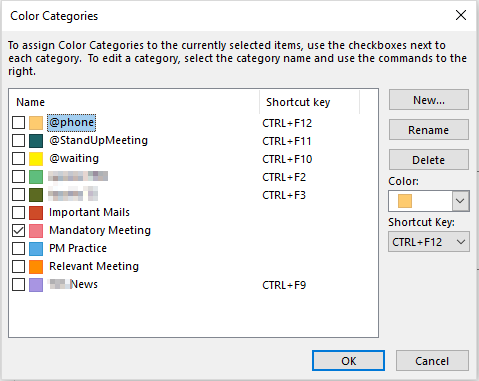
Create categories in Outlook like @Phone @StandUpMeeting @Waiting.

Outlook-Categories

Next, expand the ribbon bar in Outlook:

Expand Ribbon Bar

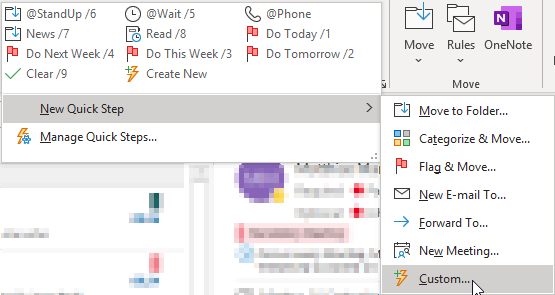
Then we create so-called QuickSteps:

Set Up Quick Step

An example of one of the specified quicksteps:

Quick Step – Standup Meeting

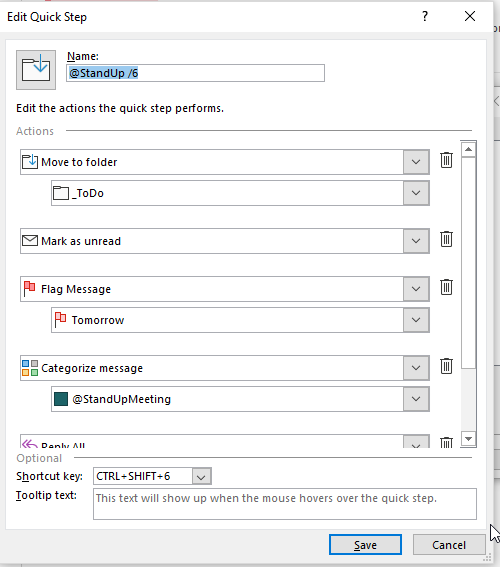
In detail it is set as follows:

Quick Step StandUp Meeting Setting 1st Part.
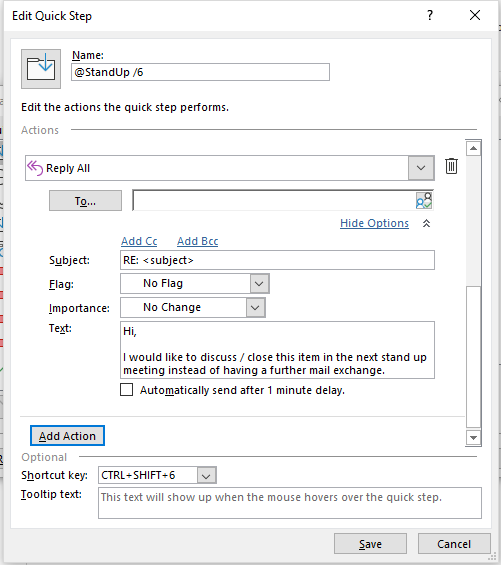
Quick Step StandUp Meeting Setting 2nd Part.

The short text of the “standard reply mail” can be entered as follows:
“Hi, I would like to discuss / close this item in the next stand up meeting instead of having a further mail exchange.”

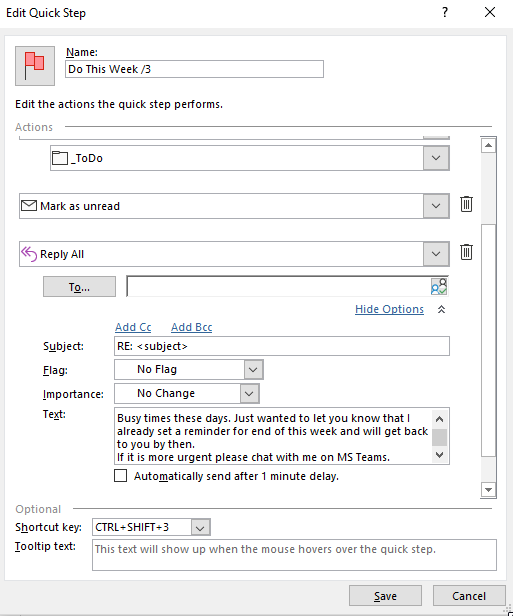
Another Quickstep can look like this:

Quick Step – To Do Next Week

with the “default mail text”: “Hello, Busy times these days. Just wanted to let you know that I already set a reminder for end of this week and will get back to you by then. If it is more urgent please chat with me on MS Teams.”

And then a Quickstep for completed tasks:

Quick Step – Closed Activities (Clear)

Finally, the following Quicksteps should be created in a modified form:

@Stand Up, @Wait, @Phone, News, Read, Do Today, Do Tomorrow, Do This Week, Do Next Week und Clear bzw. Close.

Have fun using it.

Barcamps without frustration

2 min.

Summary

If I was dissatisfied with Barcamps in the past, it was mostly because the session planning did not lead to full transparency for me. So I went to different sessions, which were a surprise for me regarding the format. I think it is important that it is very transparent for all participants, which format and which session has been planned. Sometimes the format develops differently during the session – that’s the great thing about barcamps – but the type of session makes it more secure to choose the “right” session.

How to make the session format transparent for everyone

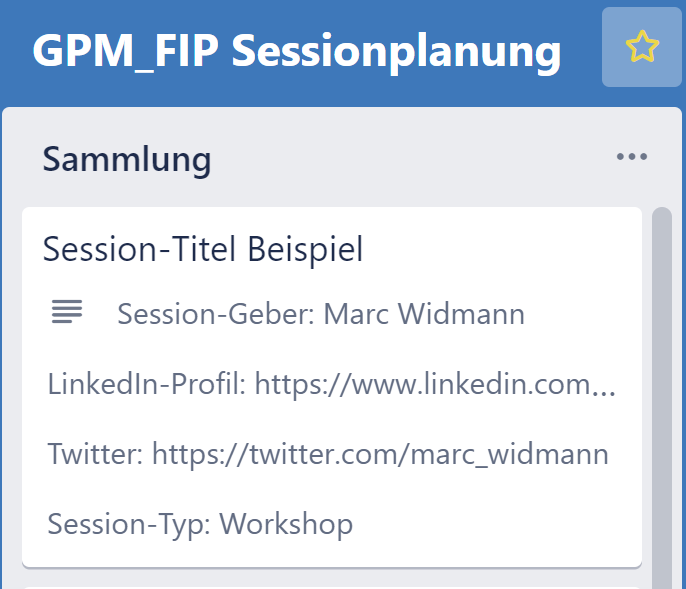
That is why face2face barcamps should show these session types (and more) on every session card with abbreviations or even on a prepared card with checkbox option.

In the virtual barcamp this categorization should also be selectable on the virtual session card. For the 4th Barcamp “Führung im Projekt” 2021 this is how it will be:

Session-Card

with following categories:

  • Workshop = max. 10-minute presentation and subsequent joint elaboration, e.g. on the electronic Microsoft whiteboard or another jointly available electronic document stored in the Team SharePoint.
  • Problem definition = collegial consultation. I have a situation that I would like to reflect on and would like to receive input.
  • Impulse presentation = maximum 15 minutes of impulse presentation and then discussion.
  • Serious Game = Exercise / learning game with the aim of providing information and education. An authentic and credible, but also entertaining learning experience is the focus of interest.

The participants for the virtual Barcamp “Guided tour in the project” will use an online form before the Barcamp and also at the beginning of the Barcamp before the planning of the session to submit their session suggestions, which are then already categorized accordingly.
To ensure the documentation of the sessions, the integration of external tools (e.g. additional electronic whiteboards besides MS Whiteboard in the session) is not desired and not allowed due to data protection reasons.


Have fun at the next barcamp and choose the right sessions!

My crisis with the corona virus and the positive change in program management

7 min.

Summary

The article examines how working in programs has changed due to the exclusively virtual way of working. Special attention is paid to the changes in governance, working methods and perception of hierarchy in the company. This contribution is accompanied by a survey on some hypotheses on the future of leadership especially under the aspect of distributed work in order to support or reject these hypotheses. Nevertheless, I will try to formulate some future prognoses on this subject already now. The article wants to give some hints which experiences we should in any case take with us into the “new normality” and thus firmly anchor them in our way of working. People and companies who do not learn and adapt from this crisis and only want to return to a supposed old normality will fail in the future.

Flashback

On March 2nd I did not go to North Rhine-Westphalia like every week before, because I had cold symptoms and since a few weeks the corona virus was on everyone’s lips, also in our program. So I thought it would be appropriate not to endanger my colleagues in the project and planned one week of remote work. Thought, done. Being one of the few “local” colleagues not to be on site, as expected, led to a lot of more time being spent for work, as now much had to be done via team video call. And this in planned meetings, which was perhaps previously easily clarified across the desk. In the course of that week, my company decided to stop all non-essential business trips and let me work exclusively from my home office. What can I say, the next few weeks were pure stress, because all the meetings, which were previously held locally and often hybrid, were now virtualized, which led to many additional hours of work. Despite my 5+ years of experience in pure home office (globally virtual distributed programs or project portfolios) in my 20+ years of experience in project and program management, virtual work during Corona was another dimension. I would like to go into this in the course.

This personal (including capacity-) crisis has, as often, also led to something better. What exactly has changed?

Changes in governance et al.

When it comes to governance, many people think first of meetings and the committee structure. This is fundamentally correct, but it is not complete. My calendar was overloaded the first 3-4 weeks of purely virtual work, because now a meeting was often set up virtually for many “little things” and then 30 minutes with colleagues was the lower limit. Thanks to Outlook. I immediately remembered the 22-minute meetings. The goal is to have meetings in

  • 22 minute slots,
  • to have a clear agenda,
  • ideally, distribute written reading material on the topic of the meeting in advance and in good time,
  • start the meeting on time and have a clear focus.

I have configured my Outlook so that meetings last either 25 minutes or 50 minutes by default. Here the settings in Outlook help to ensure this. My experience in the virtual environment is that meetings last until the planned end. On site meetings last until someone has to leave because they are changing rooms. Moving from one room to another demand time. In the virtual environment this is usually not granted. Often there is not even time for bio breaks. Unbelievable!

In order to avoid the overcrowded calendar, a daily stand-up meeting of the teams should also be planned in the virtual environment. Here it is important that appropriate video conferencing and collaboration tools are used. I use Planner from Microsoft or Trello in my volunteer work to support backlog, spintplanning and standups. With both boards, the daily stand-up meeting with a core team of a program or, as with me currently, the project portfolio management team of typical up to 7 direct reports can be supported very well. Sprint planning and retroperspectives are of course also included.

Another proven meeting sequence is to schedule escalation and decision meetings ideally several times a week and, in the best case, cancel them if nothing needs to be decided or addressed. These fixed regular dates allow for quick decisions, even in times when the calendars of our senior management are full. Should the need arise to be more than once or twice a week, the role descriptions, RACIs etc. must be checked carefully. Then, in my experience, there is not enough information and decision-making authority at the right level. Basically, my remarks on governance and escalations apply here, of course.

Due to the complete virtualization of all meetings, I have noticed a democratization of these meetings. Anyone can switch on the webcam and be present in a prominent position, unlike in hybrid meetings. Anyone can use the “raise hand” function in the collaboration tool. Everyone can see what is being drawn on the virtual whiteboard and not somewhere on a locally available flipchart. Everybody – and not just the local senior management at the table – can be seen equally in the gallery view of the video software. Quietly and secretly, this changes the style of the meetings and, above all, the greater participation of formerly “never-in-meeting room attendees”, because they are, for example, offshore.

Overall, an asynchronous working of the team is to be enabled, e.g. by check-ins in the morning (these can also be created manually in Microsoft Teams). For teams that work on different topics and only interfaces are relevant or where for whatever reason the daily stand-ups are not possible, the check-in approach is recommended in any case. An active exchange on the check-ins should take place via the comment function. Otherwise there is no added value. If a person asks the check-in question manually, no automatisms have to be established via additional tools. In my team we had solved this manually in MS Teams in which a colleague set the daily question at the start of work.

Due to the higher concentration/stringency of virtual meetings, team members quickly notice exhaustion due to the high sequence of meetings. The one or the other coffee talk can then be made possible virtually.

For me, the more intensive cooperation – intensive because of the even higher level of structuring – has confirmed that the team composition is particularly relevant as already described in 2019. For me, in the intensive virtual cooperation I noticed a weaker expression of the intercultural differences. Perhaps this is related to the democratization described above. Here it would be interesting to know what your experiences are about this. Please put them in the comments. Furthermore I have put up a few hypotheses on which I would like to hear your opinion in this Google Form.

Your more advanced hypotheses are welcome in the comments below.

Does Corona bring long-term changes?

This almost philosophical question was already intensively discussed in the media months ago and many authors came to the conclusion that the corona pandemic will change many things positively in the long term. More regionality, less travel, more … I believe realistically, many positive aspects will be forgotten, despite the long duration of the restrictive measures.

Even when the volcano Eyjafjallajökull erupted in Iceland, many had predicted that air traffic would be reduced in the long term. Immediately after the volcanic ash had blown away, air traffic was back at a very similar level.

Maybe some things will change due to the fact that nobody else could work the same way as before during the Corona ban and some things have hardened due to convenience or because companies have taken measures to avoid further shocks. Everyone, including sales representatives, conducted virtual customer conversations and were forced to work with “the unimaginable”. Let’s see.

Ultimately, the further development of the technology will anchor one or the other change in the long term, because ultimately cost-benefit considerations are always applied by individuals and companies. So we can hope that my forecast of changes as described in the article Project Manager in 2030 will come true. Perhaps our ethical and moral approaches have changed so much during Corona, which will directly lead to a change in our common future.

Which changes should be “cemented”?

The crisis described at the beginning leads to transformation. How the transformation develops and solidifies cannot be guessed in advance. Nevertheless one should of course try to “build in” as many positive aspects as possible.

Due to the asynchronous mode of operation in virtually distributed teams, early intermediate work results should be shared in any case – in line with WOL. In the office on site, the interim status review is often provided by informal coffee break conversations, which allows the maturing “product” to receive continuous feedback. In the virtual world, as much as possible of the semi-finished product should be shared in a structured way.

It is also useful to check whether your own self-organization tools are still the right ones, even when working remotely.

What I have firmly decided to do is that even if everyone else around me falls back into the “post-volcanic eruption-back-to-normal” effect, I will work virtually in a team in my programs at least every third week in order to constantly put the program into remote operation. Otherwise many positive effects will be lost.

We should also avoid hybrid meetings in the future. If parts of the team are remote, then everyone should go to virtual meetings because of the “democratization” described above and the higher effectiveness.

The definition of the communication principles in the project gain more importance due to the necessary home office work, because a formalization with more asynchronous work is absolutely essential.

There is one more thing we should maintain: The care for each other and the often heard, in my opinion, serious statement: “Stay healthy!” In this sense… Stay healthy.

Your hypotheses?

Virtual Coffee Breaks

3 min.

Summary

In times of corona (in virtual projects anyway always) communication within the team and also across close team boundaries (entire project environment) is essential for project success, but difficult to ensure. Telephone conferences can cover planned topics, but cannot bring up the spontaneous ideas that would otherwise arise in the coffee kitchen. We are all in more web conferences than ever before, but the coffee conversations are irreplaceable and therefore a few hints how to use them in virtual space.

How to do it

Just send out an calendar invite with webconference details and remove the ticks under Response Options for “Request Responses” and “Allow New Time Proposals” so that you are not bothered by replies. But leave “Allow Forwarding” ticked. But send it only to a random sample of team members and non team members ofter the wider project enviornment. Ideally initially to ~ 10 team members. Further will be receiving the invite by others. See sample text below.

With following text suggestion for the invite:

I currently have many more telephone calls than I do have meetings on site in London and I don’t get “real work” started until the evening. This is certainly not only the case with me. Nevertheless, I notice that we have far fewer contacts across provider boundaries and also across tower boundaries. That’s why I think we need more conversations that just happen to occur by chance. So please get involved in the following.
 
We just meet at the coffee machine in building C1 6th floor by chance and have a little chat. See rules and hints below.

  • Rules
    • You must join with your web cam turned on.
    • You need to have a coffee or tea prepared for yourself before joining.
    • You may forward this invite only to one further member of the Apollo program after you have participated yourself in the “coffee break.”
    • The first topic of conversation after you join the videoconference must not be business (instead, for example, homeschooling, weather in your home town).
    • The 10th or each additional participant leaves the coffee kitchen (the call) due to overcrowding and arrives a little earlier for the next appointment.
  • Notes:
    • I myself will probably not be around very often, but you can meet yourselves. When I’m there, I’m not going to host. Everyone should enforce the rules themselves.
    • You can run away from the coffee machine with everyone and chat in a small circle in the hallway (by making your own phone call).
    • I have set up 3 similar appointments. As it is known that these are distributed naturally, I am curious which of the colleagues has all 3 appointments in his calendar first. If you have all 3 coffee appointments of me in your calendar, take a screenshot of each of them and send it to me. The 10th entry receives a bottle of wine from my personal wine cabinet.
    • If somebody finds this idea stupid –> delete appointment in your calendar, but do not complain.

Your experiences

I would be interested in your experiences with such or different kind of virtual non-organized sessions. Please comment below.

What now newbie? Or who does not ask, remains stupid …

3 min.

Summary

You come to a new company and take on a new role or you take on a new project? How you plan a good handover was described in handover of a program in 6 phases. Now you are in a conversation with one of your new colleagues to determine where the shoe pinches or what needs to be tackled first. Since you will usually not only have an interview with a single colleague in order to have an overall view of the situation, it is advisable to conduct these interviews in a structured manner. For this purpose, I have collected a few questions over the years that are suitable for each interview and can raise interesting aspects.

How do I organise the interviews?

You should always differentiate between team-related and individual questions, because in the beginning it is easier to talk about the team or the overall situation than directly about your own sensitivities.

  • Team or overall situation
    • What is the biggest challenge we face right now or in the near future?
    • Why are we facing this challenge?
    • What are the most promising and untapped growth opportunities?
    • What do we have to do to realise their potential?
    • If she were me, what would you focus on?
  • Individual
    • How satisfied with your task? In which direction do you want to continue?
    • What do you expect from your job in the short / medium term?
    • What do you expect from me?
    • What are your strengths / what do you want to contribute to the team?
    • Which work processes can be improved?
    • What is the cooperation/productivity in the team/team atmosphere like?
    • What do you / the team / the department need to perform better?
  • Wishes to the genie in a bottle?
    A question that often brings up ideas that have not yet been expressed is the question about the three wishes to the fairy. Specifically this means which 3 wishes would you put to the fairy in the given context. Surprising and often very helpful answers come up. These often round off the picture or bring out completely new aspects.

How do I ask?

If the flow of conversation comes to a standstill, you want to recognize a clear priority or you want to find something out more precisely, then the following questions are appropriate.

  • Conversation fit
    It is very important to find out whether something is depressing the other person and whether the conversation is not meaningful at the moment.
  • Alternative or comparative questions
    • What’s better: this or that? Either way? Here or there?
    • If that, then what? If not so, by what means?
    • Scaling questions: On a scale from 0 to 10, how do you deal with this situation?
  • Determination of causes
    If you believe that the mentioned cause or reason is not yet substantially addressed, then follow up like a small child with 5 times “Why? If you don’t dare to use them, the 5-Why-method is also popular with scientists.
    Asking for the “why” can also reveal the reasons for the behaviour and the motivation of the behaviour.
  • Paradoxical questions or worsening questions can help in the event that creative solutions are needed or a new perspective is to be adopted. Example is, what do I have to do to make the product a flop?
  • Circular questions help to look at situations from different angles. For example, what would Mr Müller say?
  • As an alternative to the genie in the bottle question, you can also place the wonder question: The initial situation is that, as if by magic, all problems have been solved and you ask what would be different, how do you know that the problem is gone, how did the cooperation change or which other question of change can be helpful?

Achieving regularity

Carry out such discussions immediately after entering the new role or task and, above all, regularly. This will keep you on the ball. If you want to record changes early on and across the entire workforce or the entire team, my contribution to team spirit and early indication is ideal. The questions are also a good basis for an employee interview.

What belongs in the status report?

2 min.

Summary

A regular status report is important in the project. The status report is the basic information for the members of the steering committee. It is advisable to create a list of the typical contents of a report, which can be used in any presentation form. Also the status light colours must be well defined to ban the watermelon effect.

Addressees and occasion

A regular status report is important in the project. Regular means that a predefined cycle or on certain predefined occasions is created and delivered to the specified recipients. The objective is to present the progress of the project, to address decision-making needs and to point out risks and problems. The status report is the basic information for all members of the steering committee.

Content

Each status report should include the following:

  • Management Summary
  • Status light
  • Defined indicators (often performance, deadline and costs) and optionally their development in an Earned Value analysis
  • Achievements in the reporting period
  • Planned but unachieved in the period
  • Initiated or planned measures
  • Planned for the next reporting period / upcoming milestones
  • Top (3) risks
  • Necessary decisions

Status Light Colours and the Eternal Controversy

Again and again there are energetic discussions about which colour the status light should have. It often doesn’t make sense to take part in them and as a project manager you should have a clear and above all simple, easy to understand and valid definition for all levels at hand in order to be able to avert the watermelon effect (red inside, green outside). The following definition can be of help:

  • Red = Problems exist which can no longer be solved at the reporting level and which have a negative effect on the defined indicators (usually performance, deadline, costs) or which have already had an effect. Measures were not effective or not possible. There is a need for decision or action at the higher level (level above that of the reporting party).
  • Yellow = The defined indicators show plan deviations. Problems exist that the reporting person plans to solve. Measures have been or are being taken (list of measures required). The need for decision or action on the part of the higher authority is foreseeable if the measures taken do not have an effect.
  • Green = No problems at the reporting level. The defined indicators show no deviations from the plan.

A possible file naming convention for the status report can be found here.

Escalation Rules

2 min.

Summary

Escalations are nothing bad in the project or program. They are the demand for spontaneously necessary or not yet taken decisions in a defined way – provided that a regulated governance is established.

Rules

The facts of the case should always be described and agreed upon by both parties (customer and contractor).

Contents of the escalation

  • Precise description of the facts so that they can be understood directly by third parties.
  • In what area and at what time did the facts arise?
  • Who put the facts on the agenda in which reporting medium (e.g. weekly status report)?
  • What has been done to avoid the original risk or problem, to solve it when it occurs or to mitigate it?
  • Who was involved in the solution search?
  • How time-critical is the situation or by when is a solution needed?
  • Identification of the degree of risk and evaluation of the impact.
  • Which activities are proposed for the solution?
  • Description of the solution approach with estimation of the timeline, the resources and the name of the person responsible for the solution.

Communication

  • Escalation always via e-mail. Mails that do not contain all of the above should be returned.
  • Clear mention of the word “ESCALATION” in the subject line as well as in the mail itself.

Further information on the communication rules can also be found here.

Escalation steps

  • All possible measures should be taken to resolve an escalation issue at the lowest level. Before starting an escalation process, the consequences should be clearly articulated.
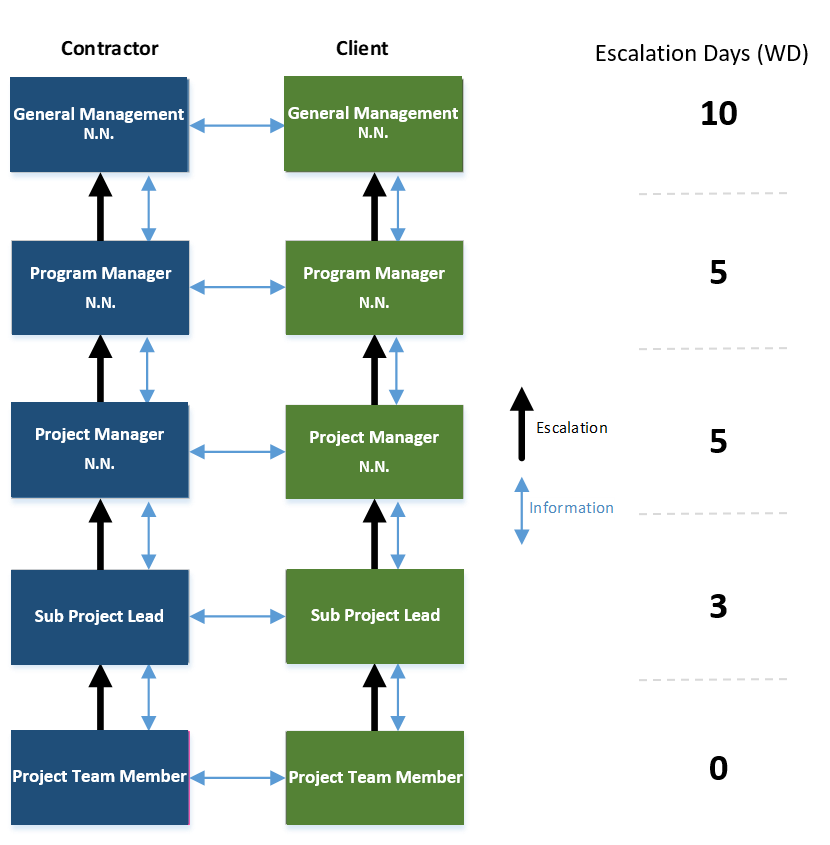
  • At each stage, an attempt should be made between both parties to find a solution. If this is not possible, the escalation issue should be passed on to the next escalation stage after prior agreement and taking into account the number of escalation days. (Escalation days = length of stay in working days at an escalation level)
  • The project manager is responsible for solving the problem and remains so at every escalation stage.
Escalation Pyramid